Visual diff for Power BI just got three additions: dependency tracking that now reaches notebooks, connections, and environment items in Fabric; a change history that filters out format-conversion and refresh noise; and a diff viewer built directly into the report page via the Motio extension. None of this requires setup — it's already live for existing customers. Full details and version numbers are in the post, and you can see it in action in a live demo or this week's webinar.
It's been a full few months at Motio. We're at Big Data London this week (Sept 22–24), next week we're in Barcelona for FabCon Europe (Sept 29–Oct 1, booth 7), and in October we're in Atlanta for IBM TechXchange (Oct 26–29, booth 679). In between, we launched an entirely new website, unveiled a new brand top to bottom, and published more than a dozen case studies from teams running Motio in production.
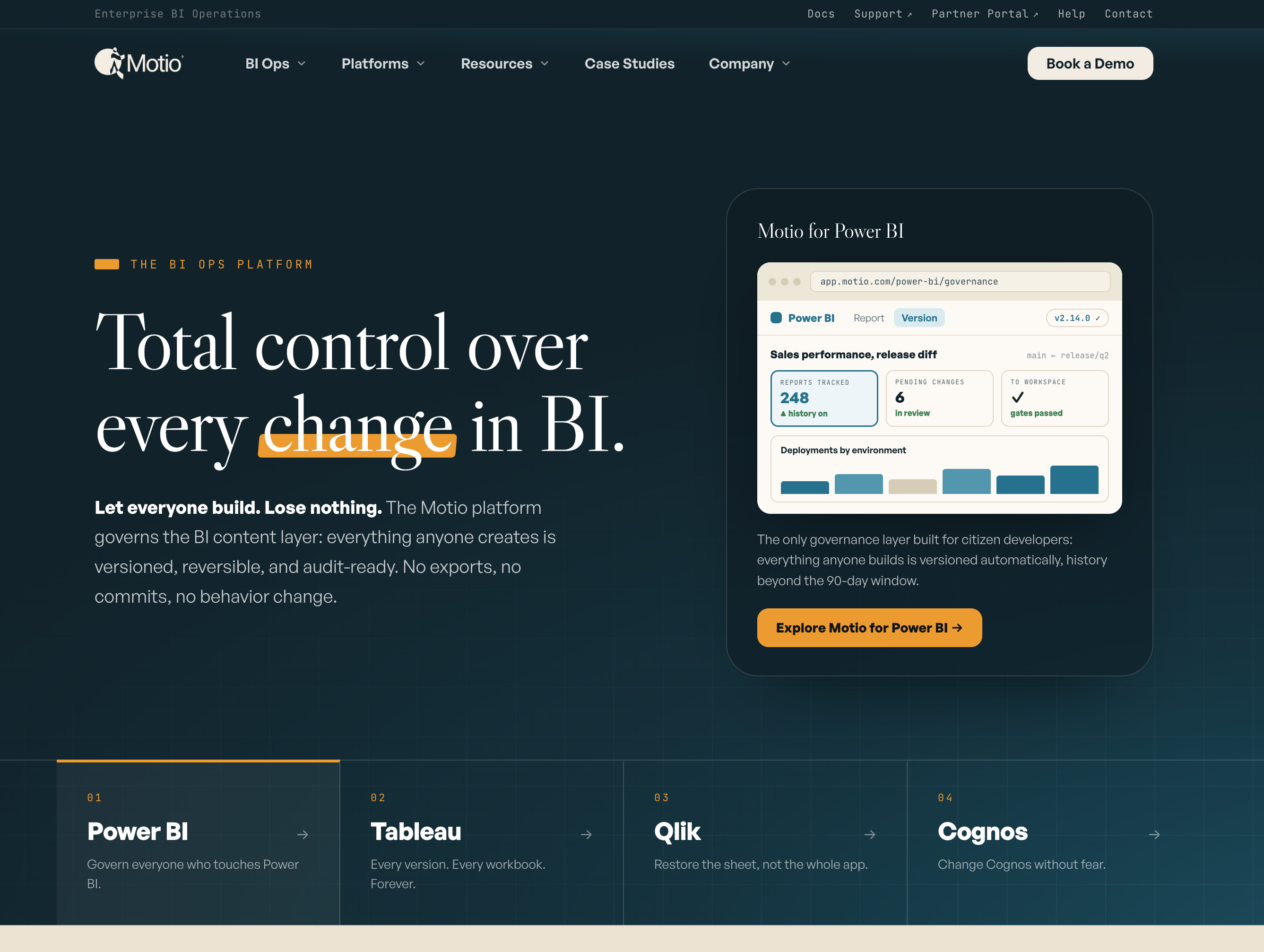
With all of that going on, the product never slowed down. This month's Platform Updates are about Motio for Power BI, and specifically about visual diff. Visual diff has been part of Motio for a while now: pick any two versions of a report or semantic model and see what changed. What we're sharing this month is how much further that comparison now reaches, and why we built each piece. If you're already a customer and want to jump straight to the upgrade, access your customer portal.
Visual diff now reads PBIR reports and TMDL models
Start with the problem most Power BI teams know too well. A number on a report looks different from last week, and nobody can say why. The old way to find out is to open two versions side by side and hunt for the difference by eye. On a report with forty visuals and a model with hundreds of measures, that can eat an afternoon, and it still might not give you an answer.
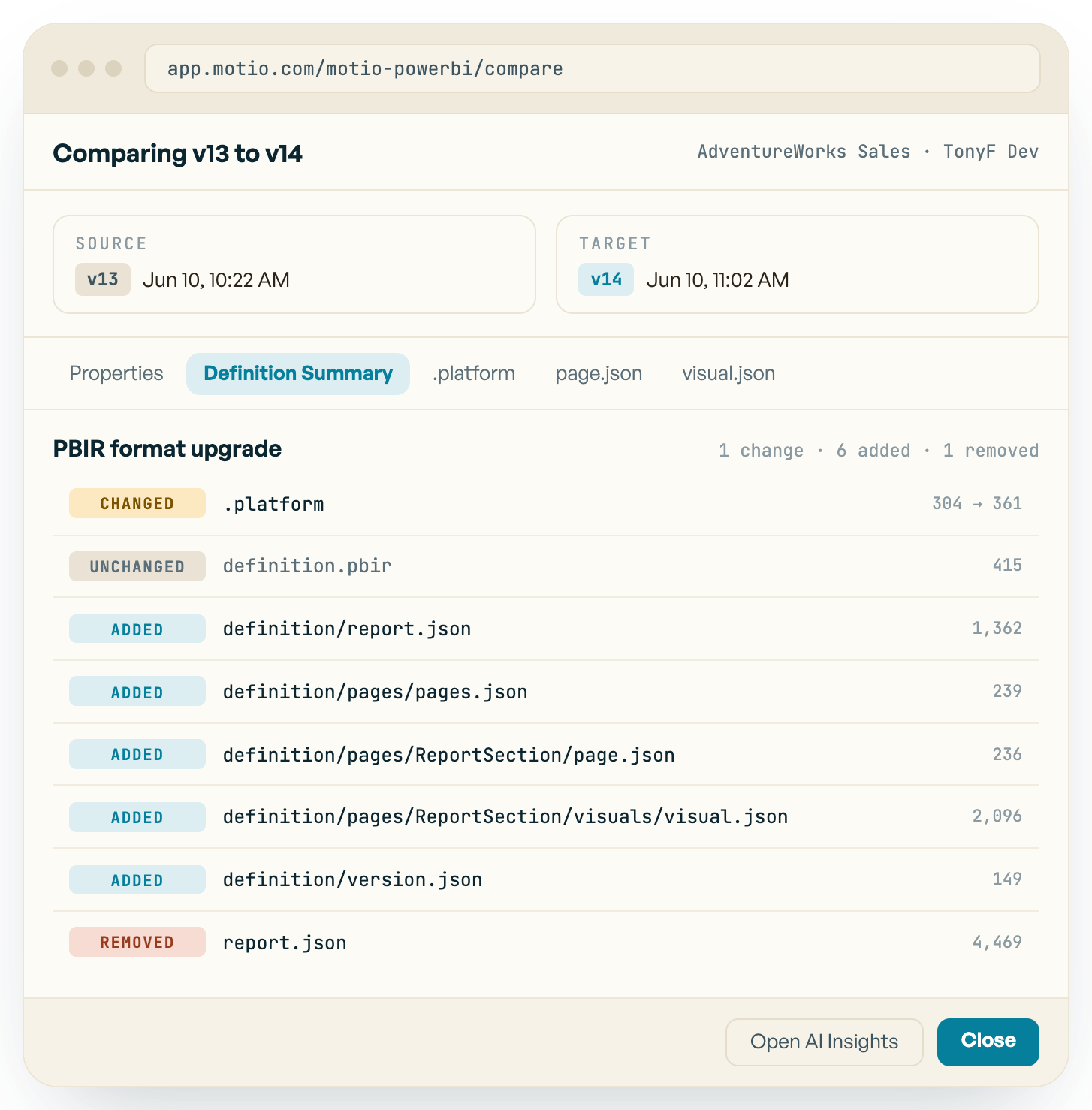
Part of the reason is the file itself. A PBIX file is a package, and comparing two of them gives you nothing a person can read. Microsoft has since moved Power BI to text-based formats: PBIR for reports and TMDL for semantic models. For reports, that switch happened automatically. Once teams updated Power BI Desktop, their reports were converted to PBIR whether they planned for it or not. So we extended visual diff to support both formats. The diff viewer now compares PBIR reports and TMDL model definitions, with a Definition Summary tab for each, and large diffs render fast enough to actually use in a review (3.2.22). TMDL definitions are also stored as comparable text (3.3.0).
What that means for you: when something moves, you see exactly what changed, where, and who changed it, instead of reconstructing it by hand. Reviews before a promotion stop being a leap of faith, and the afternoon of squinting at two windows becomes a few minutes.
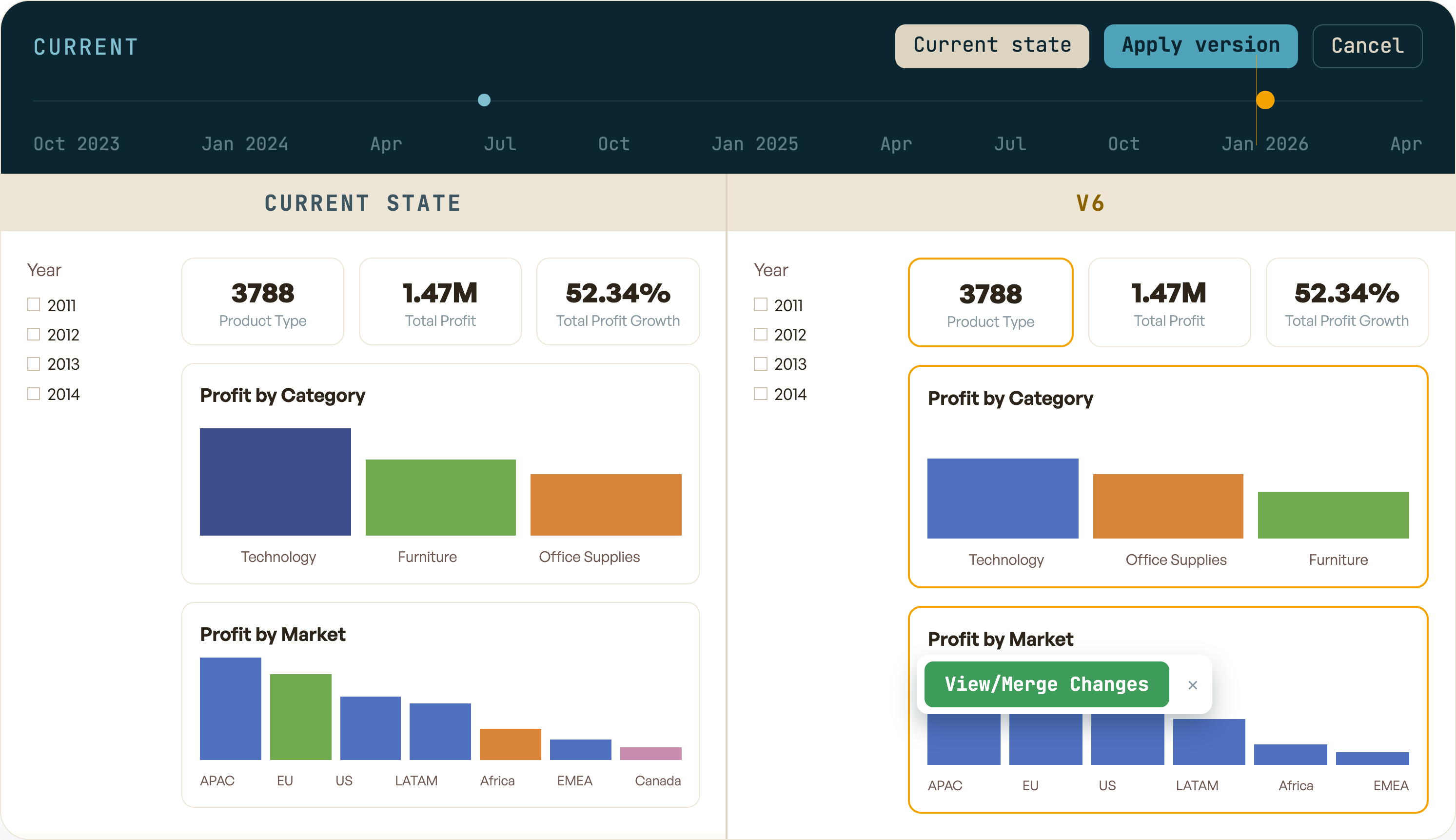
Current state beside v6. Profit by Category is outlined because its series order changed, and the changes can be merged back one visual at a time.
Dependencies show what a change reaches
Knowing what changed is only half the answer. A diff can tell you a column was renamed in a semantic model. It can't tell you that four reports and a notebook depend on that column. That's the thing you actually need to know before you approve the change, and it's usually the thing nobody knows until something breaks.
To close that gap, Motio now captures the relationships between Power BI reports and their semantic models reliably (3.2.2), and the dependency graph extends past both to notebooks, connections and environments in Fabric (3.3.0).
The result is that every diff comes with context. Before you approve, you can see everything the change touches and warn the right people. After something breaks, you start at the change and follow it outward, instead of starting at the broken report and asking around. On a model a dozen teams rely on, that's the difference between approving a change and hoping.
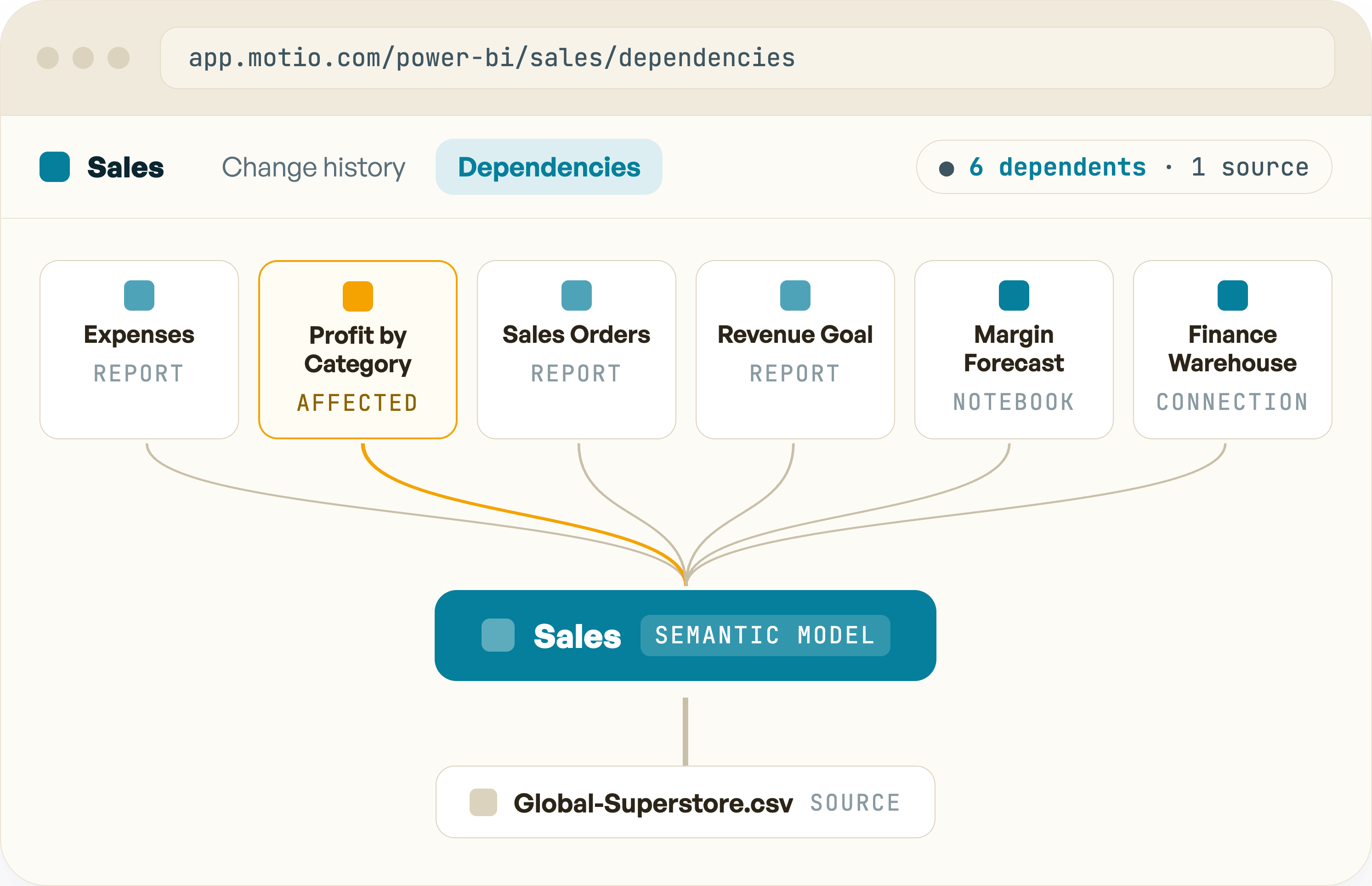
Everything that reads from the Sales semantic model: four reports, a notebook and a connection, with the source file underneath. Profit by Category is flagged because it uses the renamed column.
A change history that names the right cause
A diff is only useful if you can find the two versions worth comparing, and that's harder than it sounds. If you version Power BI in Git, a report upgraded to PBIR shows up as hundreds of files deleted and hundreds more added, as if someone rebuilt the report from scratch. Nothing about the report actually changed, but you still have to dig through all of it to be sure. Scheduled refreshes land in the history under the Power BI service account, so every one of them is another line to check.
We cleaned that up. PBIR format upgrades are now categorized as a single change rather than a flood of file edits (3.2.17). Scheduled refreshes are no longer attributed to the Power BI service account (3.2.2). And connection recency is tracked as a property, so you can see when a connection was last used (3.2.18).
Now the history reads as a sequence of decisions people made, not a machine log. The change that matters is right there instead of buried under refreshes, and that's time and attention your team gets back every time something needs explaining.
Timeline with a people-only filter. Four human changes and one format conversion recorded as a single event, with 412 refreshes from the same week filtered out.
Version history, right inside Power BI
Even with a clean history, getting to it used to mean leaving Power BI. Open a second tab, find the right report, match the IDs by hand to be sure you're looking at the same artifact. It's a small cost, but it's paid every single time, and it's exactly the kind of friction that makes people skip the step.
So we brought it to where people already work. The Motio for Power BI Extension puts the timeline, version history and deployment directly on the Power BI report page (v1.98.87). You can open the live page beside any past version, merge back a single visual instead of the whole report, save or restore a version, and tag it with a comment or ticket number while you still remember why you made the change. Deploying from a plan and viewing deployment history now happen there too, without leaving the service (v1.98.91).
The payoff is that governance stops being a separate chore. Nobody has to switch tools to check what changed or roll something back, and the comments captured at the moment of the change turn the history into something an auditor can follow.
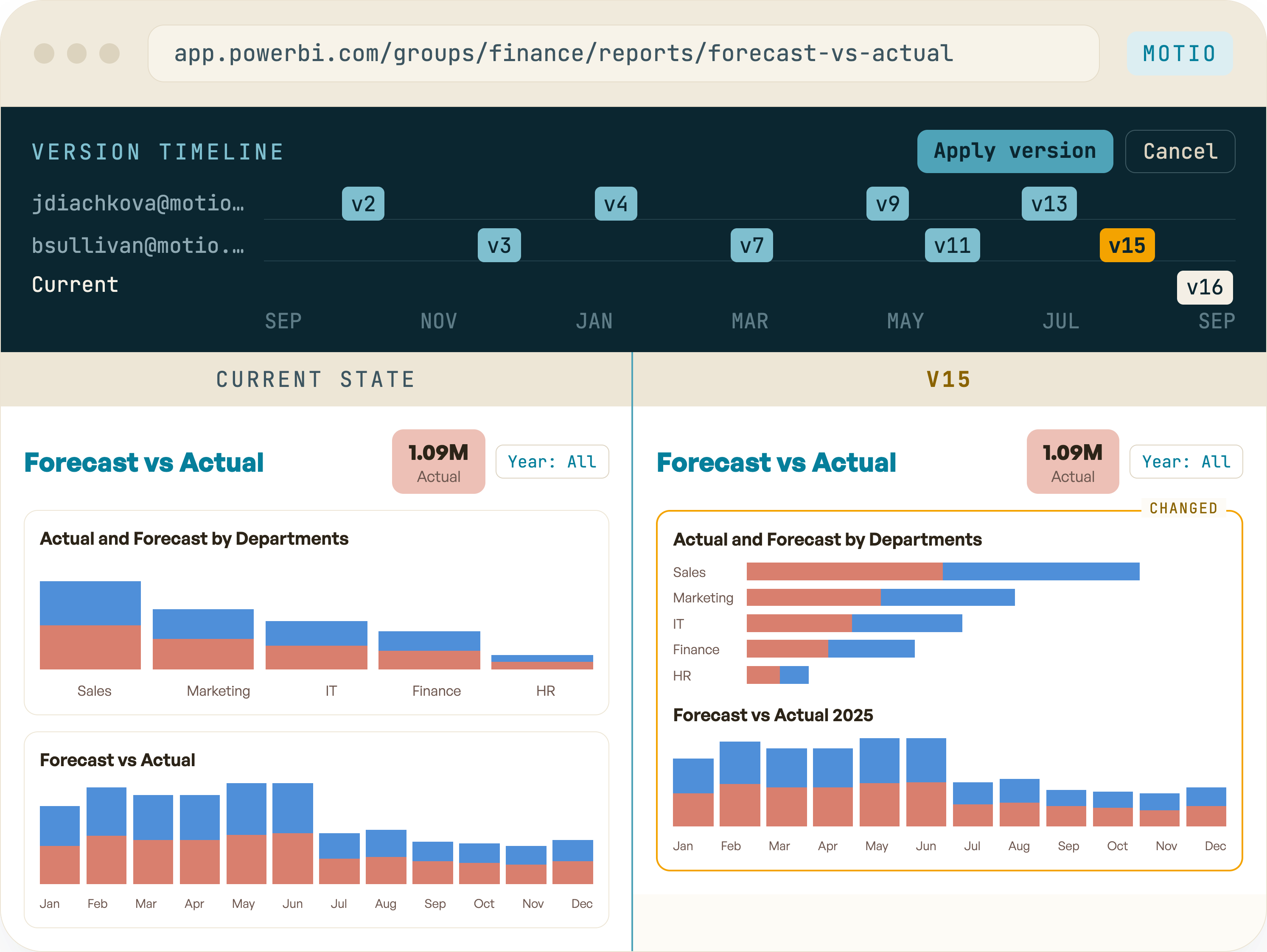
The timeline runs across the report page, with versions grouped by who saved them. Pick one and the live page opens beside it, with the changed visual outlined.
Also in this update
Alongside the bigger updates, a set of smaller improvements to Motio for Power BI shipped over the same stretch:
- Semantic model parameters versioned from the model definition (3.3.0)
- Environment items and their publish details added to the search index (3.3.0)
- Multi-word search fixed against multi-valued text fields (3.3.0)
- Report connection type criteria updated for PBIR, with semantic model added as an option (3.3.0)
- Datasource connection type exposed as a non-artifact resource (3.2.2)
- Report Usage Metrics added to the implicitly excluded list (3.2.9)
Putting it together
Here's what all of this looks like on a normal Tuesday. Someone says a number looks wrong. You open the report in Power BI, pull up the timeline, and see the two changes people made this week, without scrolling past a single refresh. The diff shows a measure was edited Monday afternoon and who edited it. The dependencies show the same model feeds three other reports, so you know who else to warn. You merge back the old measure and the number comes right.
What used to mean days of asking around now happens in one sitting, and none of it depends on anyone having remembered to save a version.
See it for yourself
If you're already a Motio customer, these updates are available for you to download and upgrade. Open any report or semantic model, pick two versions from the timeline, and compare.
Want to see any of this on your own reports? Book a demo.
We're a platinum sponsor of FabCon Europe in Barcelona, Sept 29–Oct 1. If you'd rather walk through it in person, come find us at booth 7.